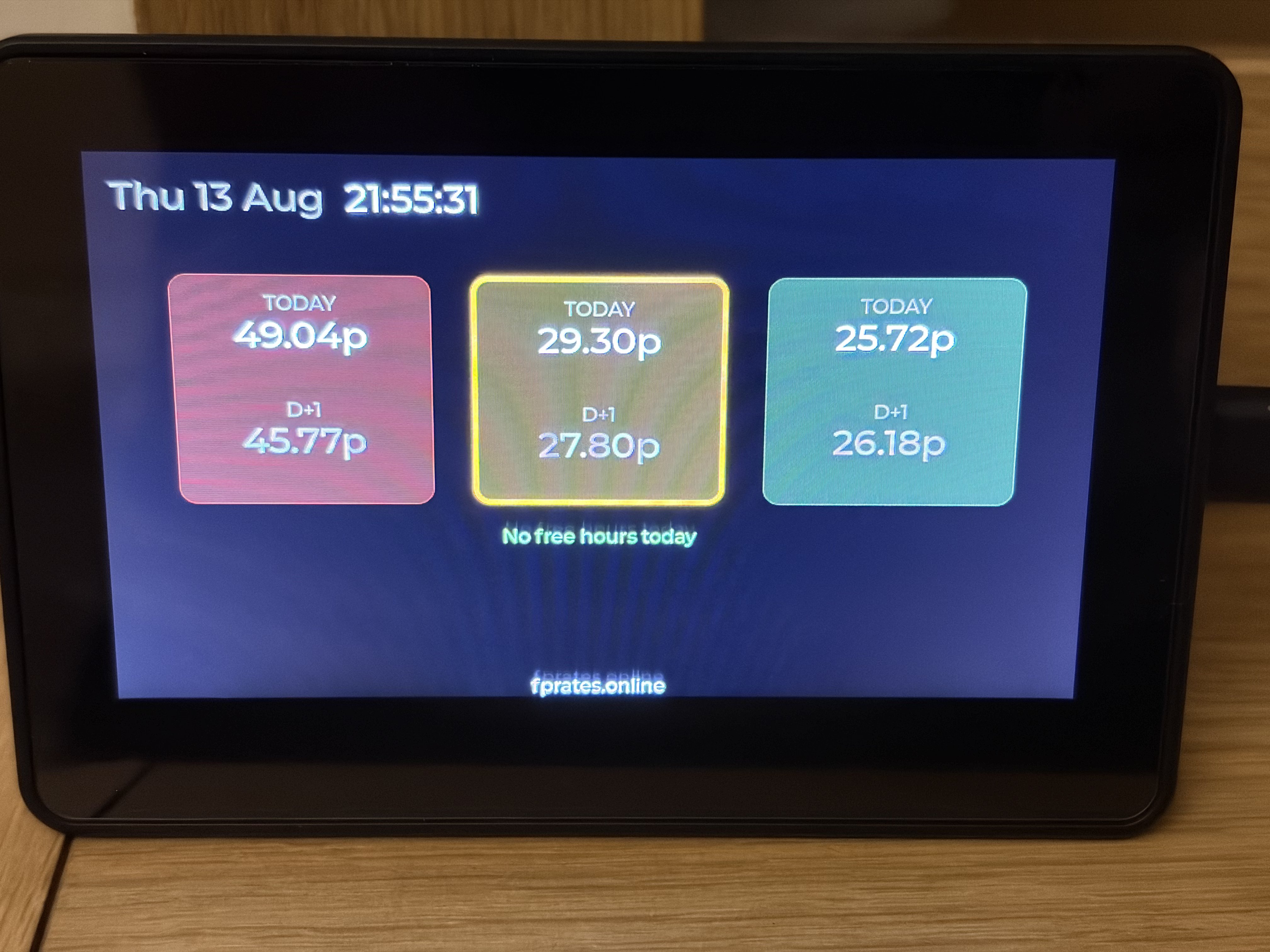
A small wall-mounted display that shows your live FreePhase rates — today's and tomorrow's Red/Amber/Green prices, current band, and free hours, updated automatically throughout the day.
What it is
FP Screen is a self-contained hardware display for FreePhase customers. It connects to your WiFi, polls FPRates every few minutes, and shows:
- Today's date and time
- Today's and tomorrow's Red/Amber/Green ceiling prices, with the current band highlighted
- Today's free hours (if any), plus a live "FREE HOUR" banner when one is active right now
The firmware is entirely open — every line is public and free to inspect, so you can verify exactly what it does before you run it on your own hardware. It's released into the Public Domain.
Setup
1Install board support
In Arduino IDE, add the ESP32 board package via Boards Manager, and install the ESP32_Display_Panel and ESP32_IO_Expander libraries.
2Install LVGL 8.3.x
The default LVGL install (9.x) is not compatible with this firmware — install version 8.3.x specifically via Library Manager.
3Add the board config file
Download esp_panel_board_custom_conf.h below and place it alongside the main sketch file. This sets the board's real resolution (800×480) and pin mapping — do not change the ESP_PANEL_USE_1024_600_LCD flag from 0, or the display alignment will break.
4Set the partition scheme
In Tools → Partition Scheme, choose "No OTA (2MB APP/2MB SPIFFS)" — the default scheme doesn't fit this board's 4MB flash correctly.
5Enable PSRAM
In Tools → PSRAM, select OPI PSRAM.
6Edit and flash the firmware
Download the .ino file below, open it in Arduino IDE, and edit these three lines near the top with your own details:
const char *WIFI_SSID     = "your-wifi-name";
const char *WIFI_PASSWORD = "your-wifi-password";
const char *API_REGION    = "G";   // see region codes below
Then select your board (ESP32S3 Dev Module) and port, and hit Upload.
Download
Download firmware (.ino)
Download board config (.h)
Download LVGL port (.cpp)
Download LVGL port (.h)
fprates_screen.ino and esp_panel_board_custom_conf.h are released into the Public Domain — use, modify, and redistribute freely.
lvgl_v8_port.cpp and lvgl_v8_port.h — © 2024-2025 Espressif Systems (Shanghai) CO LTD, from Waveshare's demo package for this board (not FPRates code).
Region codes
Set API_REGION to the letter matching your electricity distribution region:
G — North West England
A — Eastern
B — East Midlands
C — London
D — Merseyside & North Wales
E — Midlands
F — Northern
H — Southern
J — South Eastern
K — South Wales
L — South Western
M — Yorkshire
N — South of Scotland
P — North of Scotland
FPRates is an independent service and is not affiliated with, endorsed by, or connected to EDF Energy in any way. EDF and FreePhase are trademarks of EDF Energy.